


Training a DisplayPort Cable Insertion Policy and ROS Deployment#
This tutorial walks you through how to train a DisplayPort plug insertion reinforcement learning (RL) policy that transfers from simulation to a real Flexiv robot. The workflow consists of two main stages:
Simulation Training in Isaac Lab: Train the policy in a high-fidelity physics simulation with domain randomization
LEAPP Export and Real Robot Deployment: Export the trained policy with LEAPP, then deploy on hardware with Isaac ROS
This walkthrough covers the key principles and best practices for sim-to-real transfer using Isaac Lab.
Supported Robot:
Flexiv Rizon 4s: 7-DOF collaborative robot arm with Grav parallel gripper
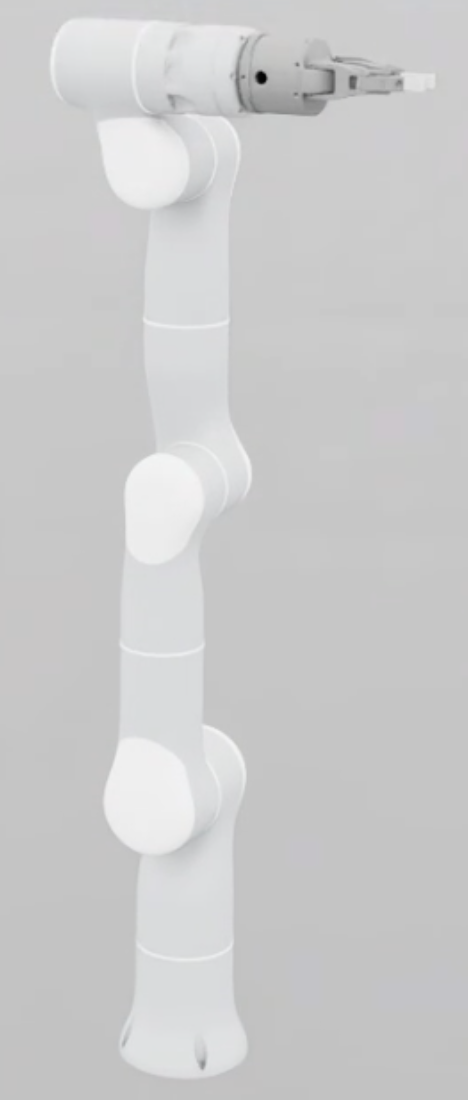
Flexiv Rizon 4s with the Grav gripper used for the DisplayPort insertion task.#
This environment has been successfully deployed and tested on a real Flexiv Rizon 4s robot without an IsaacLab dependency.
Task Details:
The DisplayPort insertion policy operates as follows:
Initial State: The policy assumes the DisplayPort plug is already grasped by the gripper at the start of the episode
Input Observations: The policy receives the current state of the robot together with the pose of the socket insertion point (position and orientation) from a separate perception pipeline. The robot state is the arm joint angles in the joint-space variants, or the flange / end-effector pose in the task-space variants
Policy Output: The policy outputs an incremental command each step — delta joint positions (incremental changes to arm joint angles) in the joint-space variants, or a 6-DoF Cartesian end-effector pose delta in the task-space variants
Task Goal: Insert the DisplayPort plug into a fixed socket until the mate point aligns within the success threshold
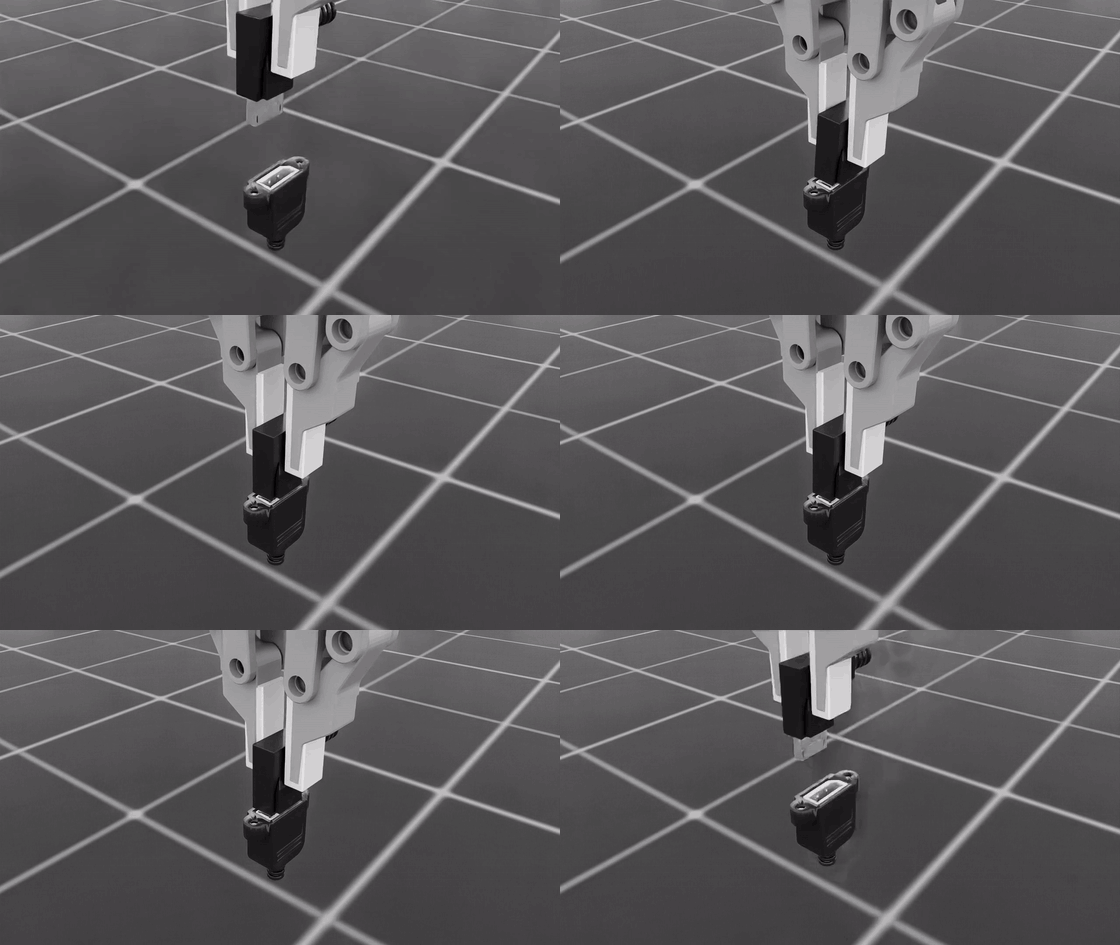
DisplayPort insertion overview from the training course material.#
Both control spaces are supported end-to-end. Task space is the recommended route for real-robot deployment; see Choosing a Control Space for the trade-offs and for the extra robot-calibration step joint space requires.
Scope of This Tutorial:
This tutorial covers training and LEAPP export in Isaac Lab. For the complete on-robot workflow (vision pipeline, robot interface, ROS inference), refer to the Isaac ROS Documentation after exporting your policy.
Code Layout:
The task is packaged under the standalone isaaclab_training namespace:
src/isaaclab_training/tasks/displayport_insertion/displayport_insertion_env_cfg.py— shared task MDP (scene, assets, observations, rewards)src/isaaclab_training/tasks/displayport_insertion/insertion_env.py— environment class that logs insertion success metrics during trainingsrc/isaaclab_training/tasks/displayport_insertion/config/displayport_rizon_4s/— Flexiv Rizon 4s + Grav robot-specific overrides and gym registrationssrc/isaaclab_training/tasks/displayport_insertion/config/displayport_rizon_4s/joint_pos_env_cfg.py— joint-space (relative joint position) environmentsrc/isaaclab_training/tasks/displayport_insertion/config/displayport_rizon_4s/task_space_env_cfg.py— task-space (operational space control) environmentsrc/isaaclab_training/mdp/— reusable observation, action, reward, event, noise, and termination helpersuv run isaaclab train --rl_library rsl_rl— Isaac Lab’s packaged unified trainersrc/isaaclab_training/cli/play_policy_io.py/uv run isaaclab-training-play-policy-io— DisplayPort-specific inference, LEAPP validation, and CSV loggingsrc/isaaclab_training/cli/export_policy.py/uv run --extra leapp isaaclab-training-export— packaged LEAPP exportersrc/isaaclab_training/export/contracts.py— task-specific LEAPP I/O contracts such asdisplayport_task_space
Overview#
Successful sim-to-real transfer requires addressing three fundamental aspects:
Input Consistency: Ensuring the observations your policy receives in simulation match those available on the real robot
System Response Consistency: Ensuring the robot and environment respond to actions in simulation the same way they do in reality
Output Consistency: Ensuring any post-processing applied to policy outputs in Isaac Lab is also applied during real-world inference
When all three aspects are properly addressed, policies trained purely in simulation can achieve robust performance on real hardware without any real-world training data.
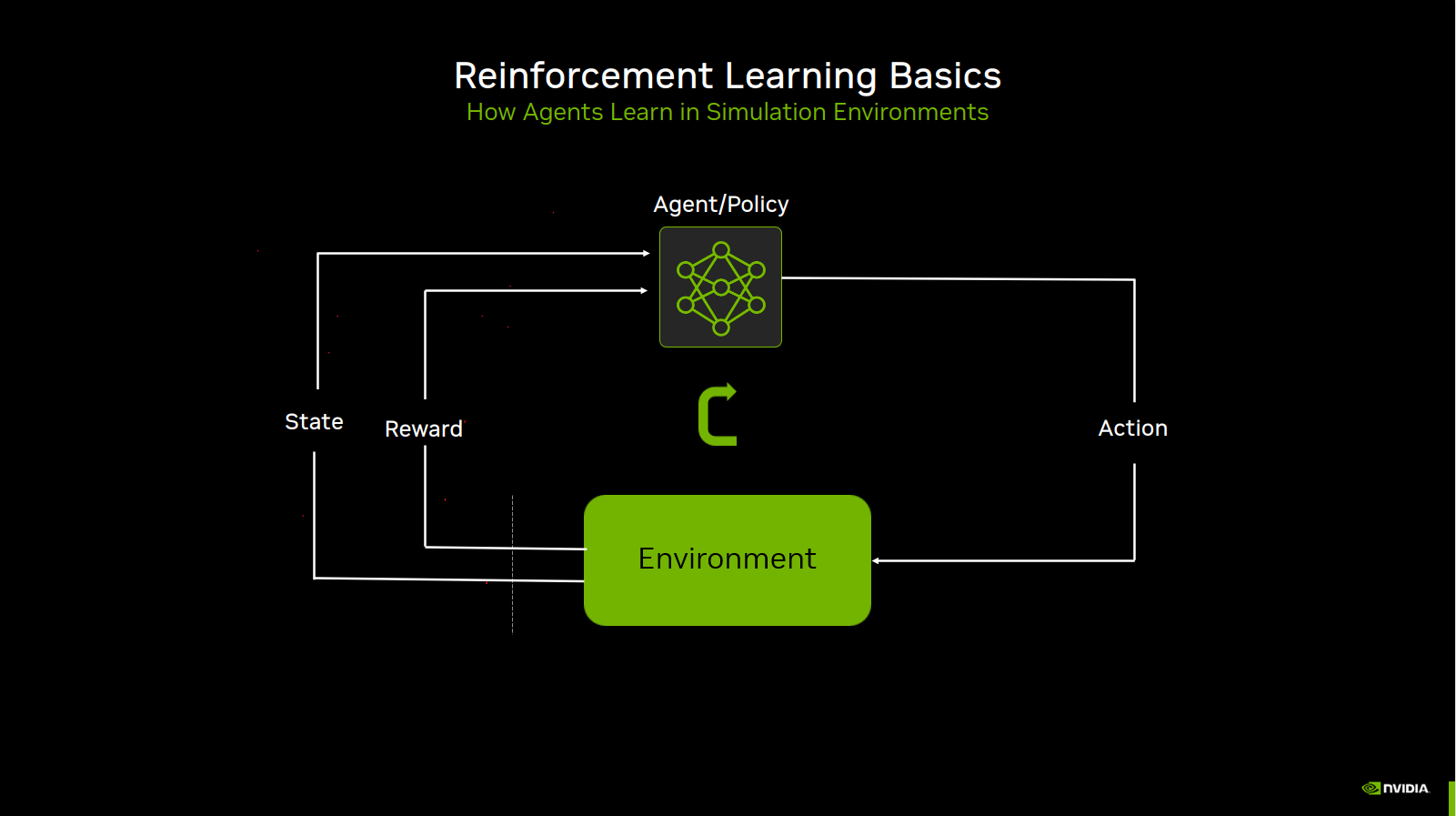
Reinforcement-learning loop used during training.#
Debugging Tip: When your policy fails on the real robot, set up the real robot with the same initial observations as in simulation, then compare how the controller responds. This isolates whether the problem is from observation mismatch (Input Consistency) or physics/controller mismatch (System Response Consistency).
Asset Quality for Insertion Tasks#
For any contact-rich insertion task, the quality of the plug and socket assets matters more than most other sim-to-real knobs. DisplayPort insertion in particular operates at very small clearances between plug blades and the socket cavity. If the USD collision geometry, mass properties, or joint behavior are wrong, no amount of reward tuning or domain randomization will produce a policy that transfers well to hardware.
The DisplayPort plug and socket assets used by these environments are published on the Isaac asset server (under Props/Factory/display_port_cable_assets) and fetched at load time rather than vendored in the repository. They have been iterated extensively and work well for training policies that transfer sim-to-real. Expect considerable upfront effort to reach this quality for a new connector or cable type.
What to validate before training:
Static insertion pose stability: Load the plug fully inserted into the socket at the goal pose (no robot, no gripper). The plug should remain seated without drifting, jittering, or being ejected by contact forces. Persistent separation or slow creep at the mated pose usually indicates incorrect collision meshes, rest offsets, or mass/inertia.
Collision fidelity at clearance scale: Blade-to-cavity gaps are sub-millimeter. Convex hulls or coarse meshes often produce false contacts, snagging, or penetration. SDF or carefully authored triangle meshes with tuned
contact_offset/rest_offsetare typically required.Engagement behavior: Push the plug through the approach path by hand (or with scripted motion) and confirm contact feels plausible — no explosive pops, no tunneling through the socket wall, no sticky high-friction jamming unless that matches the real connector.
Grasped plug stability: With the gripper closed at the training grasp width, the plug should not spin or slip unrealistically when the arm moves. Cable mass and plug COM should be representative of the real assembly.
Mate-point alignment: Verify
SOCKET_INSERTION_OFFSET,PLUG_INSERTION_OFFSET, andPLUG_GOAL_ROTindisplayport_insertion_env_cfg.pymatch the intended physical mate frame. Reward and success metrics are computed from these offsets; a mismatch here looks like a perception error on the real robot.
The robot asset matters too. The checks above concern the plug and socket, but the arm’s USD must also
represent your robot — particularly its kinematic parameters, which may vary unit to unit. This matters most for
joint-space training, where the policy commands joints directly. These environments spawn the stock
FLEXIV_RIZON4S_GRAV_GRIPPER_CFG asset, which describes a nominal Rizon 4s
rather than any particular unit. Flexiv’s
flexiv_calibration
workflow exports a calibrated robot description for a specific arm; convert the result to USD and point the robot
spawn config at it before training a policy you intend to deploy.
Practical workflow:
Fix assets in isolation (drop-test or basic play env with fixed poses) before running full RL training.
Compare sim behavior to real hardware video at the same poses — look for drift, bounce, and penetration, not policy success rate.
Only after assets pass these checks, tune curriculum, rewards, and domain randomization.
Note
Poor asset quality often shows up as policies that learn high training success but fail on hardware with inconsistent contact behavior, or as training that never achieves high Metrics/success_rate despite reward tuning. Fix the assets first.
Part 1: Input Consistency#
The observations your policy receives must be consistent between simulation and reality. This means:
The observation space should only include information available from real sensors
Sensor noise and delays should be modeled appropriately
Using Real-Robot-Available Observations#
Your simulation environment should only use observations that are available on the real robot and not use “privileged” information that would not be available in deployment. The critic receives additional privileged observations (plug pose and joint velocities) to improve value estimation during training, but these are not passed to the actor at deployment time.
Observation Specification#
The DisplayPort insertion environment uses proprioceptive and exteroceptive (vision) observations. In every variant the actor sees the current state of the robot plus the socket insertion (mate) point supplied by perception. What differs between the two control spaces is how the robot state is represented: joint angles for the joint-space environments, and the flange / end-effector pose for the task-space environments.
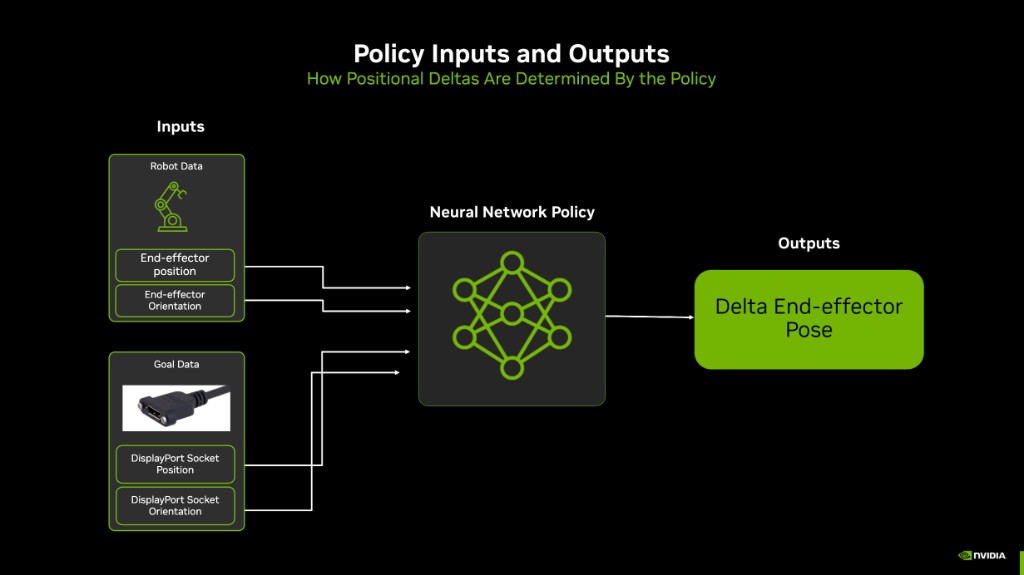
Task-space policy inputs and outputs: end-effector pose, socket pose, and a relative Cartesian command.#
Observation |
Dim |
Real-World Source |
Noise |
|---|---|---|---|
|
7 |
Robot controller |
None |
|
7 |
Robot controller |
None |
|
3 |
Perception pipeline |
±10mm |
|
4 |
Perception pipeline |
None |
Recommended shipping configuration (NoJointVel variants): 14 policy dimensions
(7 joint positions + 3 socket position + 4 socket quaternion).
Training configuration with joint velocity (Grav variants without NoJointVel): 21 policy dimensions.
Note
Within joint space, prefer the NoJointVel variants. Policies trained with joint_vel in the actor
observation can achieve slightly higher success rates in simulation, but we consistently observe less
stable behavior on the real Flexiv robot (jittery motions, inconsistent contact during insertion).
The NoJointVel configs remove joint_vel from the actor observation while keeping it in the critic
observation group. This matches deployment setups where joint velocity is not exposed to the policy
network but can still help the value function during training.
This is a choice among the joint-space variants; the task-space environments are recommended over joint space generally (see Choosing a Control Space), and they do not expose joint velocity to the actor at all.
Observation |
Dim |
Real-World Source |
Noise |
|---|---|---|---|
|
3 |
Robot controller |
None |
|
6 |
Robot controller |
None |
|
3 |
Perception pipeline |
None by default |
|
6 |
Perception pipeline |
None by default |
Shipping configuration (TaskSpace variants): 18 policy dimensions
(3 + 6 end-effector pose + 3 + 6 socket keypoint frame).
Orientations use a 6D rotation representation (the first two rows of the rotation matrix) rather than a quaternion. This is continuous over SO(3), which avoids the sign-flip discontinuity a quaternion introduces and is easier for the network to regress against.
The end-effector position is reported at the tool center point (TCP), i.e. the flange body offset
along its local +Z by _TCP_OFFSET in task_space_env_cfg.py. Note that the observation is taken at the
TCP while the action is applied at the flange; see Action Space Design.
Implementation (base class):
@configclass
class PolicyCfg(ObsGroup):
    """Observations for policy group."""

    joint_pos = ObsTerm(
        func=mdp.joint_pos,
        params={"asset_cfg": SceneEntityCfg("robot", joint_names=[".*"])},
    )
    joint_vel = ObsTerm(
        func=mdp.joint_vel,
        params={"asset_cfg": SceneEntityCfg("robot", joint_names=[".*"])},
    )
    socket_pos = ObsTerm(
        func=mdp.rigid_object_pos_w,
        params={"asset_cfg": SceneEntityCfg("dp_socket"), "offset": SOCKET_INSERTION_OFFSET},
        noise=ResetSampledConstantNoiseModelCfg(
            noise_cfg=UniformNoiseCfg(n_min=-0.01, n_max=0.01, operation="add")  # ±10mm
        ),
    )
    socket_quat = ObsTerm(
        func=mdp.rigid_object_quat_w,
        params={"asset_cfg": SceneEntityCfg("dp_socket")},
    )

    def __post_init__(self):
        self.enable_corruption = True
        self.concatenate_terms = True
Rizon 4s overrides (in config/displayport_rizon_4s/joint_pos_env_cfg.py):
# Arm joints only — gripper joints are excluded from observations
self.observations.policy.joint_pos.params["asset_cfg"].joint_names = [
    "joint1", "joint2", "joint3", "joint4", "joint5", "joint6", "joint7",
]
Task-space actor group (in config/displayport_rizon_4s/task_space_env_cfg.py):
@configclass
class PolicyCfg(ObsGroup):
    """Actor observations: EEF pose + socket keypoint frame (18 dims)."""

    eef_pos = ObsTerm(
        func=mdp.eef_pos_w,
        params={"asset_cfg": SceneEntityCfg("robot"), "body_name": "flange", "offset": _TCP_OFFSET},
    )
    eef_rot_6d = ObsTerm(
        func=mdp.eef_rot_6d_w,
        params={"asset_cfg": SceneEntityCfg("robot"), "body_name": "flange"},
    )
    socket_kp_pos = ObsTerm(
        func=mdp.rigid_object_pos_w,
        params={"asset_cfg": SceneEntityCfg("dp_socket"), "offset": SOCKET_INSERTION_OFFSET},
    )
    socket_kp_rot_6d = ObsTerm(
        func=mdp.rigid_object_rot_6d_w,
        params={"asset_cfg": SceneEntityCfg("dp_socket")},
    )
In both control spaces the critic additionally receives privileged state that the actor never sees: joint positions and velocities plus the plug keypoint frame (task space) or the plug pose (joint space).
Why No Noise for Proprioceptive Observations?
As with the gear assembly task, policies trained without noise on proprioceptive observations transfer well to the Flexiv Rizon 4s. The controller provides sufficiently accurate joint state feedback that modeling sensor noise on joint states does not improve sim-to-real transfer for this task. The same reasoning carries over to the task-space variants: the end-effector pose is derived from those same joint encoders through forward kinematics, so it inherits their accuracy and is likewise left noise-free.
The socket pose, by contrast, comes from perception and is the observation worth corrupting. The joint-space
environments apply ±10 mm of reset-sampled uniform noise to socket_pos by default. The task-space environments
ship with observation noise disabled so the contract matches the deployed perception stack exactly; add it through
the observation term’s noise field if your perception pipeline is less accurate.
Part 2: System Response Consistency#
Once your observations are consistent, ensure the simulated robot and environment respond to actions the same way the real system does. For DisplayPort insertion this involves:
Physics simulation parameters (friction, contact properties, plug/socket collision meshes)
Actuator modeling (PD controller gains, effort limits)
Domain randomization and curriculum
Physics Parameter Tuning#
Accurate physics simulation is critical for contact-rich insertion. The DisplayPort plug and socket use SDF collision meshes with high solver iteration counts on the rigid bodies:
# From displayport_insertion_env_cfg.py — DisplayPortPlug / DisplayPortSocket
rigid_props=sim_utils.RigidBodyPropertiesCfg(
    solver_position_iteration_count=128,
    solver_velocity_iteration_count=1,
    max_depenetration_velocity=0.5,  # plug; socket uses 5.0
),
collision_props=sim_utils.CollisionPropertiesCfg(
    contact_offset=0.00001,   # plug
    rest_offset=-0.00005,
),
The Flexiv Rizon 4s arm uses lower solver iteration counts for performance, matching the gear assembly Flexiv configuration:
# From config/displayport_rizon_4s/joint_pos_env_cfg.py
rigid_props=sim_utils.RigidBodyPropertiesCfg(
    disable_gravity=True,
    max_depenetration_velocity=5.0,
    solver_position_iteration_count=4,
    solver_velocity_iteration_count=1,
    max_contact_impulse=1e32,
),
collision_props=sim_utils.CollisionPropertiesCfg(
    contact_offset=0.005,
    rest_offset=0.0,
),
Friction randomization (in config/displayport_rizon_4s/joint_pos_env_cfg.py):
plug_physics_material = EventTerm(
    func=mdp.randomize_rigid_body_material,
    mode="startup",
    params={
        "asset_cfg": SceneEntityCfg("dp_plug", body_names=".*"),
        "static_friction_range": (0.001, 0.001),
        "dynamic_friction_range": (0.001, 0.001),
    },
)

robot_physics_material = EventTerm(
    func=mdp.randomize_rigid_body_material,
    mode="startup",
    params={
        "asset_cfg": SceneEntityCfg("robot", body_names=".*finger.*"),
        "static_friction_range": (0.75, 0.75),
        "dynamic_friction_range": (0.75, 0.75),
    },
)
Low plug/socket friction reduces sticking during blade engagement. Gripper finger friction is set to match real grasp behavior.
Actuator Modeling#
The Rizon 4s uses ImplicitActuatorCfg with per-joint-group arm tuning from FLEXIV_RIZON4S_GRAV_GRIPPER_CFG, plus dedicated Grav gripper actuators:
# Grav gripper actuator configuration
self.scene.robot.actuators["gripper_drive"] = ImplicitActuatorCfg(
    joint_names_expr=["finger_joint"],
    effort_limit_sim=2.0,
    velocity_limit_sim=1.0,
    stiffness=2e3,
    damping=1e1,
)
self.scene.robot.actuators["gripper_passive"] = ImplicitActuatorCfg(
    joint_names_expr=[".*_knuckle_joint"],
    effort_limit_sim=1.0,
    velocity_limit_sim=1.0,
    stiffness=0.0,
    damping=0.0,
)
Note
Flexiv Rizon 4s: Domain randomization for actuator gains and joint friction is not included in the Rizon 4s EventCfg. The real-world Flexiv controller is stable and precise enough that the simulation policy transfers without these additional randomizations, consistent with the gear assembly Flexiv setup.
Action Space Design#
In both control spaces the policy commands only the arm; the gripper is not in the action space — the plug is held at a fixed grasp width for the episode. The action is always an incremental (delta) command, never an absolute target. What differs is the space that delta lives in.
The policy controls the 7 arm joints using incremental joint position control.
self.joint_action_scale = 0.025  # ±1.4 degrees per step

self.actions.arm_action = mdp.RelativeJointPositionActionCfg(
    asset_name="robot",
    joint_names=["joint1", "joint2", "joint3", "joint4",
                 "joint5", "joint6", "joint7"],
    scale=self.joint_action_scale,
    use_zero_offset=True,
)
Action dimension: 7 — one delta per arm joint, in radians.
The policy emits a 6-DoF Cartesian pose delta which an Operational Space Controller (OSC) converts into joint efforts. This removes joint-level system identification from the sim-to-real path: the same policy can drive the real robot through a task-space bridge.
_ACTION_SCALE = 0.025          # 25 mm and 0.025 rad per step
_STIFFNESS = (300.0, 300.0, 300.0, 30.0, 30.0, 30.0)

self.actions.arm_action = mdp.DeployOperationalSpaceControllerActionCfg(
    asset_name="robot",
    joint_names=_ARM_JOINTS,
    body_name="flange",
    controller_cfg=OperationalSpaceControllerCfg(
        target_types=["pose_rel"],
        motion_stiffness_task=_STIFFNESS,
        ...
    ),
    position_scale=_ACTION_SCALE,
    orientation_scale=_ACTION_SCALE,
)
Action dimension: 6 — [dx, dy, dz, dθx, dθy, dθz], the first three in metres and the last three in
radians.
Two details matter for deployment:
The arm’s joint PD gains are zeroed (
actuators[...].stiffness = 0.0); all compliance comes from the task-space stiffness above, so the controller — not the joint servo — sets the contact behavior.The action is applied at the flange, while
eef_posis observed at the TCP. Observation and control therefore use different frames by design; the real-robot bridge must reproduce that split.
Action scale: 0.025 in both cases — read as radians per joint per step in joint space, and as metres /
radians per step in task space.
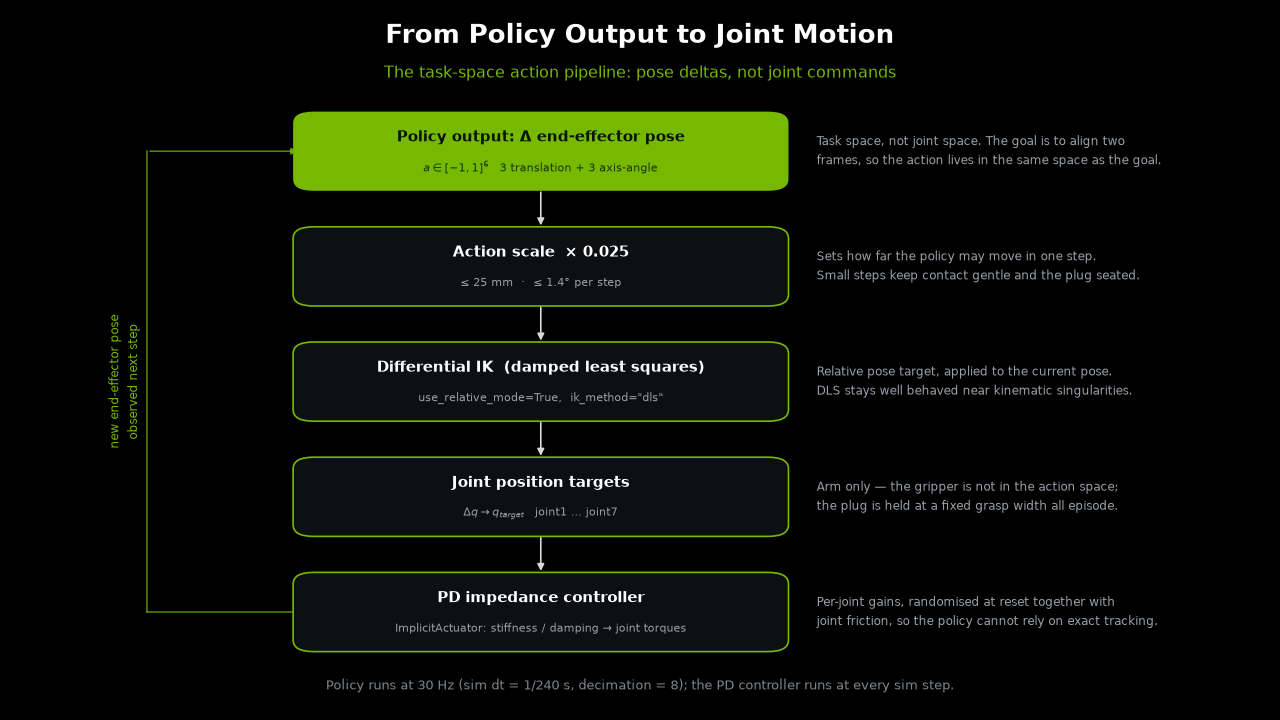
Task-space action pipeline: scaled pose delta, task-space controller, joint targets, and robot response.#
Control frequency: sim.dt = 1/240 s with decimation = 8 → 30 Hz policy rate, identical in both
control spaces.
Domain Randomization Strategy#
Socket pose randomization perturbs the fixed socket to cover perception and mounting variation:
randomize_socket_pose = EventTerm(
    func=mdp.reset_root_state_uniform,
    mode="reset",
    params={
        "pose_range": {
            "x": [-0.01, 0.01],                        # ±1 cm
            "y": [-0.01, 0.01],                        # ±1 cm
            "z": [-0.02, 0.02],                        # ±2 cm
            "roll": [-math.radians(2.0), math.radians(2.0)],
            "pitch": [-math.radians(2.0), math.radians(2.0)],
            "yaw": [-math.radians(2.0), math.radians(2.0)],
        },
        "asset_cfg": SceneEntityCfg("dp_socket"),
    },
)
Plug reset curriculum starts episodes with the plug near the goal pose and anneals toward farther approach poses:
reset_plug_curriculum = EventTerm(
    func=mdp.reset_plug_at_goal_curriculum,
    mode="reset",
    params={
        "at_goal_prob": 0.8,
        "at_goal_prob_final": 0.0,
        "anneal_start_iter": 0.0,
        "anneal_end_iter": 500.0,
        "num_steps_per_env": 512,
        "insertion_axis": [1.0, 0.0, 0.0],
        "at_goal_depth_range": [0.0, 0.015],      # 0–15 mm engaged
        "approach_depth_range": [0.02, 0.06],     # 20–60 mm approach
        "normal_pose_range": {
            "x": [-0.02, 0.02],
            "y": [-0.02, 0.02],
            "z": [0.0, 0.0],
        },
    },
)
At the start of training, 80% of resets place the plug near the inserted pose; this probability linearly anneals to 0% over 500 training iterations, forcing the policy to learn full approach and insertion.
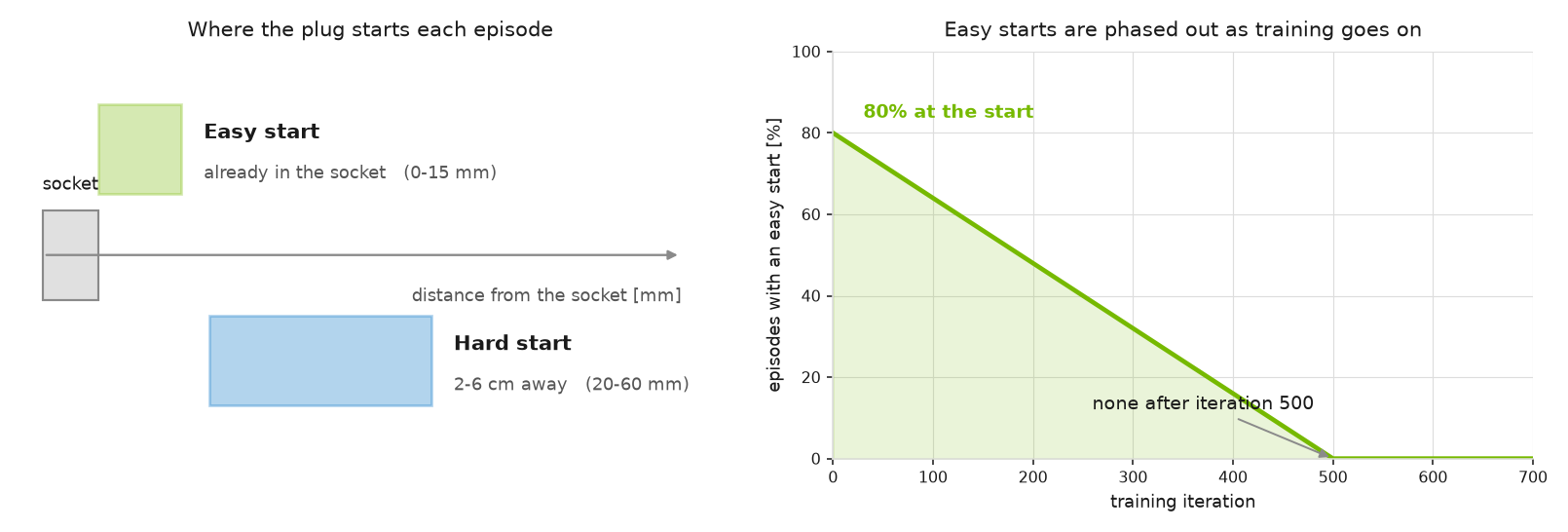
Reset curriculum: early episodes often begin near insertion, then anneal toward full approach starts.#
Initial robot pose is set via inverse kinematics to a grasp pose on the plug at each reset.
grasp_offset / end_effector_body_name / num_arm_joints are applied in
Rizon4sGravDisplayportInsertionEnvCfg.__post_init__:
set_robot_to_grasp_pose = EventTerm(
    func=mdp.set_robot_to_object_grasp_pose,
    mode="reset",
    params={
        "target_object_name": "dp_plug",
        "grasp_offset": [0.0025, 0.0, -0.1875],  # plug local frame [m]
        "end_effector_body_name": "flange",
        "num_arm_joints": 7,
    },
)
Reward Shaping#
The environment uses keypoint-based rewards that measure alignment between the plug and socket insertion mate points. Reward terms are defined in displayport_insertion_env_cfg.py:
Keypoint tracking (
plug_socket_keypoint_tracking): Penalizes L2 keypoint distance between plug and socket mate framesExponential keypoint tracking (
plug_socket_keypoint_tracking_exp): Dense exponential reward for fine alignmentAction rate (
action_rate_l2): Penalizes large action changes for smooth motions
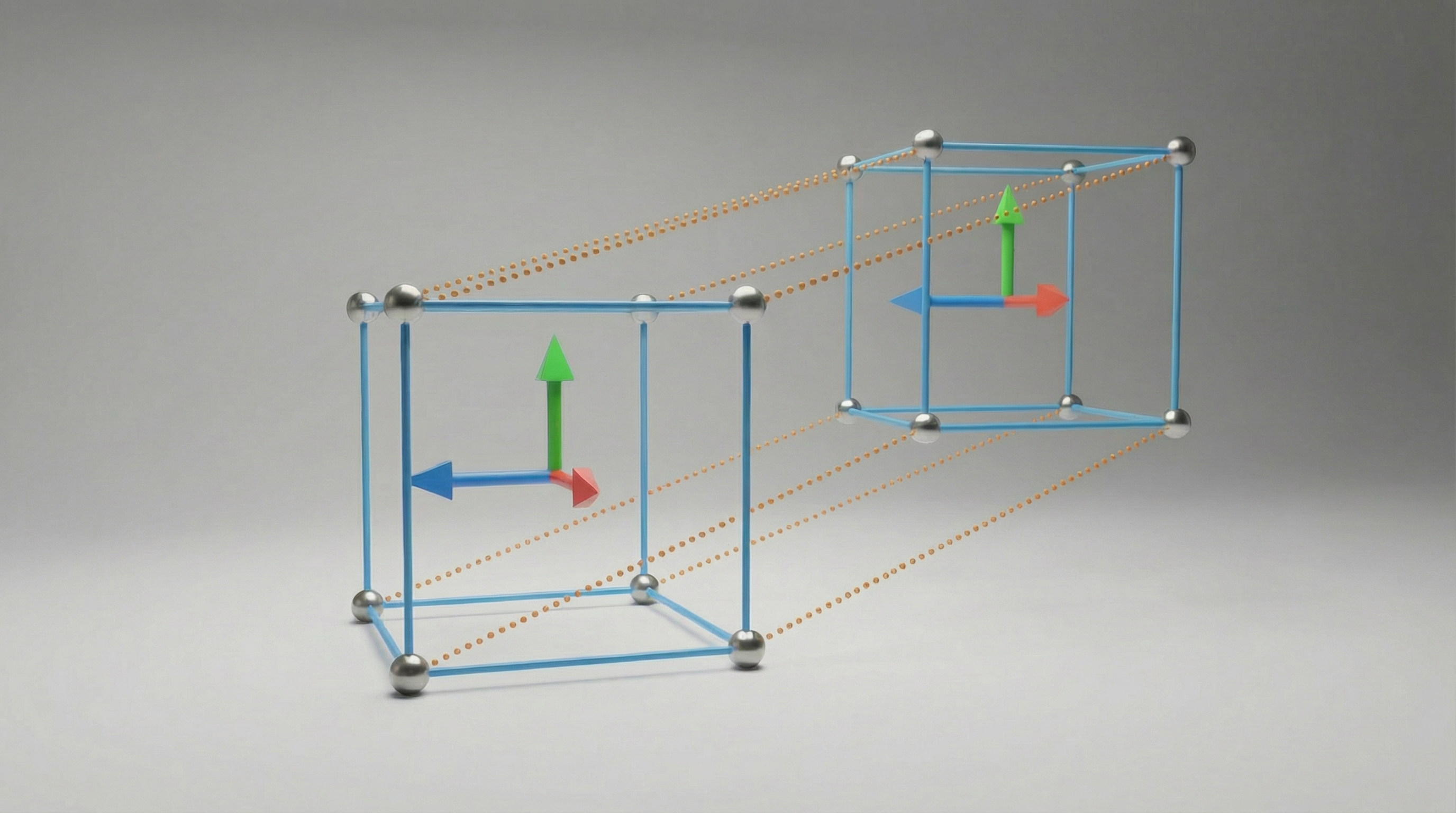
Keypoint-pair reward intuition. Corresponding plug/socket keypoints collapse only when position and orientation agree.#
The Rizon 4s config sets the linear and exponential keypoint reward weights to a 1:1 ratio:
self.rewards.plug_socket_keypoint_tracking_exp.weight = abs(
    self.rewards.plug_socket_keypoint_tracking.weight
)
Terminations#
In addition to the episode timeout, the Rizon 4s config terminates early when:
Plug dropped: End-effector moves more than 15 cm away from the plug grasp point
Plug orientation exceeded: Roll or pitch deviation exceeds 15° relative to the grasp frame
Training Metrics#
Unlike gear assembly, this task uses a custom environment class (DisplayportInsertionEnv) to log insertion metrics to TensorBoard without changing the MDP:
Metrics/success_rate— fraction of environments within the 3 mm mate-point thresholdMetrics/plug_socket_pos_error_m— mean mate-point distanceMetrics/plug_socket_keypoint_dist_m— mean keypoint distanceMetrics/terminal_success_rate— success rate at episode reset
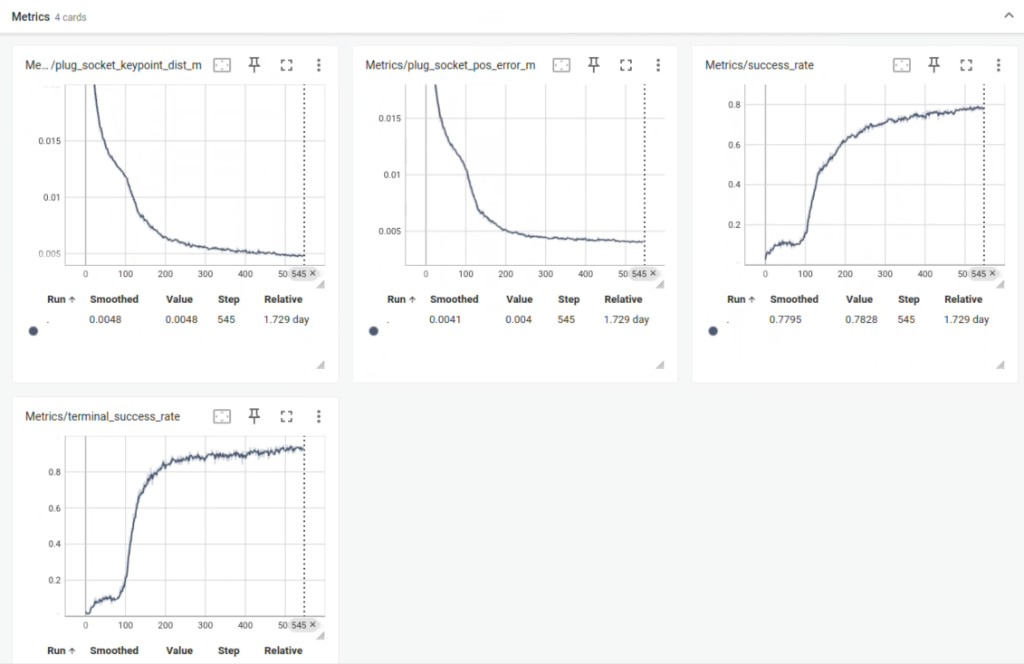
Task-level TensorBoard metrics: success rate, terminal success rate, mate-point distance, and keypoint distance.#
Tuning Hyperparameters for Better Performance#
After asset quality and physics look correct, the following hyperparameters are the main levers for improving training speed, final success rate, and sim-to-real robustness. Defaults below are the shipped Flexiv Rizon 4s values; adjust one group at a time and monitor Metrics/terminal_success_rate in TensorBoard.
Reward Weights#
Defined in displayport_insertion_env_cfg.py; the Rizon 4s config overrides the exponential weight in joint_pos_env_cfg.py.
Parameter |
Default |
Effect |
|---|---|---|
|
|
Linear penalty on keypoint distance. More negative → stronger pull toward alignment. |
|
|
Exponential bonus near the goal. Increase relative to linear for sharper fine-insertion behavior; decrease if policy is brittle or stalls short of full insertion. |
|
|
Per-keypoint exponential scales. Higher first values tighten the reward basin around the goal. |
|
|
Spatial extent of keypoint offsets. Affects how rotation errors contribute relative to translation. |
|
|
Smoothness penalty. More negative → slower, smoother motions; too strong can prevent final insertion force. |
1:1 linear-to-exponential weighting (current shipping default):
self.rewards.plug_socket_keypoint_tracking_exp.weight = abs(
    self.rewards.plug_socket_keypoint_tracking.weight
)
If the policy approaches but does not fully seat the plug, try increasing the exponential weight or tightening kp_exp_coeffs. If it rushes and bounces off the socket, increase action_rate magnitude or reduce the exponential weight.
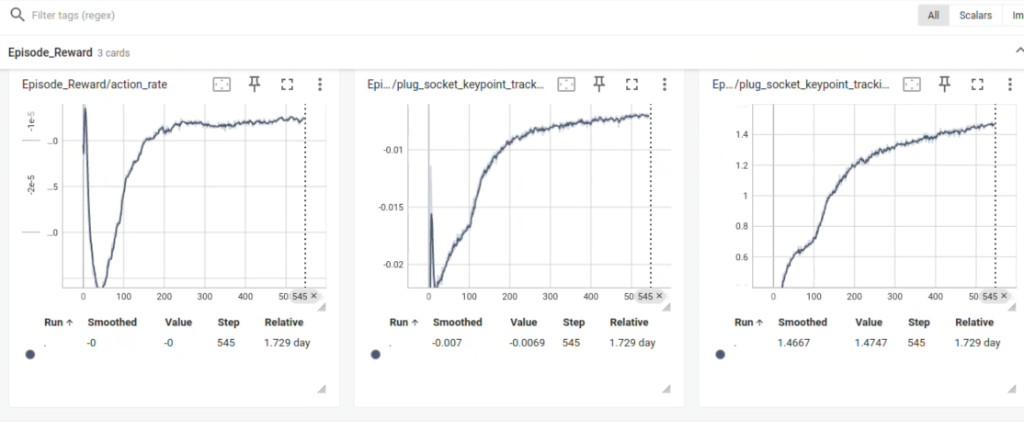
Reward terms over training for the DisplayPort policy.#
Reset Curriculum#
Defined in config/displayport_rizon_4s/joint_pos_env_cfg.py → reset_plug_curriculum.
Parameter |
Default |
Effect |
|---|---|---|
|
|
Fraction of resets with plug near full insertion. Higher start values make early learning easier; anneal to zero for full approach behavior. |
|
|
Training iterations over which at-goal probability anneals. Extend (e.g. 800–1000) if success rate drops when curriculum gets harder; shorten if training is too slow to reach approach poses. |
|
|
How deep the plug starts when sampled “at goal” (0–15 mm engaged). Narrow for fine final-insertion practice; widen slightly if the policy never sees near-mated contacts. |
|
|
Standoff distance when not at goal (20–60 mm). Increase upper bound for harder long-range approach; decrease if the policy struggles to reach the socket mouth. |
|
±2 cm lateral |
Lateral misalignment when not at goal. Widen for more robustness to perception error; narrow if training fails to converge. |
If Metrics/success_rate is high early but collapses after iteration ~500, the curriculum may be annealing too aggressively — extend anneal_end_iter or raise at_goal_prob_final temporarily.
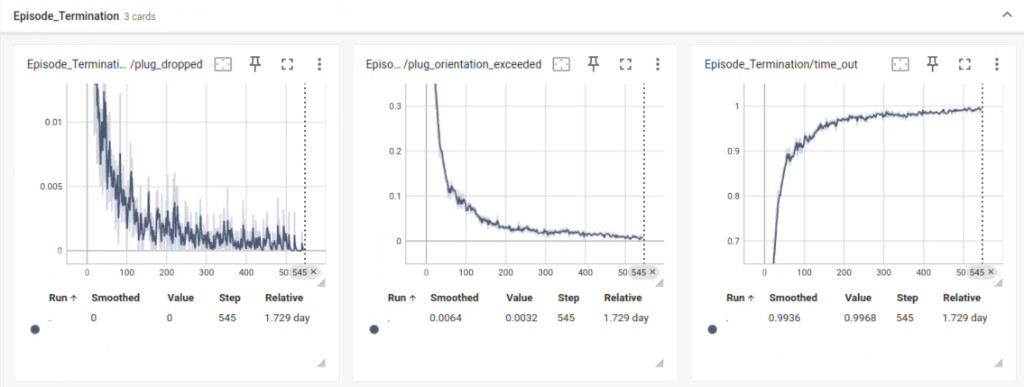
Episode termination causes over training.#
Domain Randomization and Observations#
Parameter |
Default |
Effect |
|---|---|---|
|
±1 cm XY, ±2 cm Z, ±2° |
Socket pose DR. Widen to match real perception/mount error; narrow if the policy cannot learn a baseline insertion. |
|
±10 mm |
Perception noise on mate point. Increase for more robust real-world pose error; decrease if sim policy is too conservative. |
Plug/socket friction (startup) |
|
Low friction reduces unrealistic jamming. Tune only after visual sim-vs-real comparison — wrong friction can dominate insertion feel. |
Gripper finger friction |
|
Affects grasp stability during insertion forces. |
Actions and Grasp#
Parameter |
Default |
Effect |
|---|---|---|
|
|
Max joint delta per step (~±1.4°). Increase if real robot stiction prevents reaching targets; decrease for finer final alignment. |
|
|
EE-to-plug transform for IK reset. Wrong values cause dropped-plug terminations or misaligned approach. |
|
|
Grav finger_joint grasp command. Adjust if plug slips or is over-compressed during insertion. |
Terminations and Success Metrics#
Parameter |
Default |
Effect |
|---|---|---|
|
|
Mate-point distance counted as success in |
|
|
Early reset if EE leaves plug. Tighten to discourage release; loosen if false positives during large motions. |
Orientation thresholds (roll/pitch) |
|
Reset if plug tilts excessively relative to grasp frame. |
RL Algorithm (PPO)#
Defined in config/displayport_rizon_4s/agents/rsl_rl_ppo_cfg.py.
Parameter |
Default |
Effect |
|---|---|---|
|
|
Total training iterations. Extend if success rate is still climbing at the end. |
|
|
Rollout length per iteration. Affects curriculum annealing rate (tied to |
|
|
PPO learning rate. Reduce if training is unstable; increase if learning is very slow. |
|
|
Target KL for adaptive LR schedule. |
|
|
Exploration noise. Lower for fine-tuning a near-working policy. |
Suggested tuning order: (1) confirm asset/physics quality, (2) curriculum depth and anneal schedule, (3) linear vs exponential reward balance, (4) socket pose DR and observation noise, (5) action scale, (6) PPO training length.
Part 3: Training the Policy in Isaac Lab#
Registered Gym Environments#
Train on the -ROS-Inference ids. They are the environments used to produce the policies deployed on
hardware: in addition to the plain training configuration, they declare the observation/action metadata Isaac
Manipulator and LEAPP consume (obs_order, policy_action_space, observation_space, action_space,
action_scale) and pin the plug, socket and seed joint pose to the real deployment station. Training on them
means the environment you trained in and the contract you export are the same thing, so a checkpoint can be
exported and deployed with Isaac ROS without swapping configurations.
Environment ID |
Purpose |
|---|---|
|
Task-space training and deployment — recommended. Carries the ROS / LEAPP export contract. |
|
Task-space training without deployment metadata (ablations, experiments) |
|
Task-space evaluation / visualization (observation corruption disabled) |
|
Joint-space training and deployment. Carries the ROS / LEAPP export contract (14-dim actor obs). |
|
Joint-space training without deployment metadata |
|
Evaluation / visualization (observation corruption disabled) |
|
Joint-space ROS inference with joint velocity in actor obs (21-dim) |
|
Training with joint velocity in actor obs (21-dim) |
|
Evaluation with joint velocity in actor obs |
The plain training ids remain useful when you are experimenting and do not intend to deploy that particular
checkpoint — for example when sweeping rewards or randomization. If you later want to ship such a checkpoint, export
it against the matching -ROS-Inference id so the traced layout matches deployment.
Note
Running the commands. uv is the recommended workflow (see
isaaclab-installation-root), and the commands below use it from this standalone repository.
Training goes through Isaac Lab’s packaged CLI (uv run isaaclab train ...), while DisplayPort
export and inference use this repository’s entry points
(uv run isaaclab-training-export and uv run isaaclab-training-play-policy-io). Add
--extra leapp for LEAPP export and --group sim when you need the Isaac Sim dependency.
Note
Training and play use the unified RL entrypoints. You must pass --rl_library rsl_rl.
This repository does not require an Isaac Lab source checkout.
Step 1: Visualize the Environment#
Launch training with a small number of environments and visualization enabled to verify the setup. Pick the tab for the control space you intend to deploy — task space is the recommended choice for real-robot transfer (see Choosing a Control Space):
uv run isaaclab train --rl_library rsl_rl \
    --task IsaacTraining-DisplayPortInsertion-Rizon4s-Joint-NoJointVel-ROS-Inference \
    --num_envs 4 \
    --max_iterations 100 \
    --visualizer kit
uv run isaaclab train --rl_library rsl_rl \
    --task IsaacTraining-DisplayPortInsertion-Rizon4s-TaskSpace-ROS-Inference \
    --num_envs 4 \
    --max_iterations 100 \
    --visualizer kit
What to Expect:
In early training, the robot moves the grasped plug toward the socket but will not insert reliably yet. Verify that:
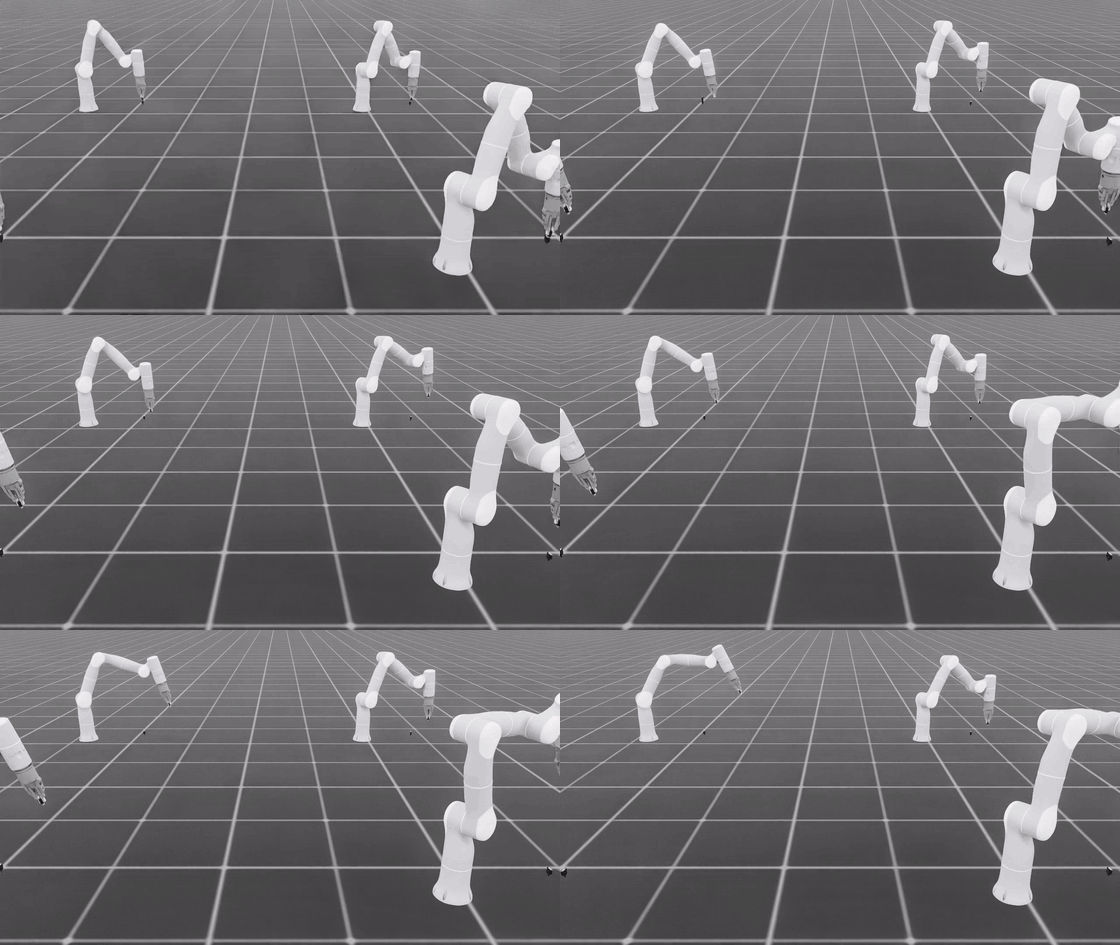
Early untrained behavior: the robot explores around the socket before the insertion behavior has been learned.#
The plug is grasped at reset and held throughout the episode
The socket pose randomization and plug curriculum produce varied starting configurations
Contact between plug blades and socket looks physically plausible
With the plug placed in the fully inserted pose (no policy), it stays seated without drift or instability
Stop training (Ctrl+C) once the environment looks correct, then proceed to full-scale training.
Trained policy replay in Isaac Lab with the reset curriculum disabled.#
Step 2: Full-Scale Training with Video Recording#
Launch full training in headless mode with video recording:
uv run isaaclab train --rl_library rsl_rl \
    --task IsaacTraining-DisplayPortInsertion-Rizon4s-Joint-NoJointVel-ROS-Inference \
    --num_envs 256 \
    --viz none \
    --video --video_length 200 --video_interval 76800
uv run isaaclab train --rl_library rsl_rl \
    --task IsaacTraining-DisplayPortInsertion-Rizon4s-TaskSpace-ROS-Inference \
    --num_envs 256 \
    --viz none \
    --video --video_length 200 --video_interval 76800
Multi-GPU (distributed) training — for example on a cluster / OSMO workflow, launch the packaged Isaac Lab
trainer under your cluster’s distributed wrapper and keep --distributed in the Isaac Lab arguments:
uv run isaaclab train --rl_library rsl_rl \
    --task <TASK_ID> \
    --num_envs <NUM_ENVS> \
    --viz none --distributed \
    agent.max_iterations=<MAX_ITERS> \
    --video --video_length 200 --video_interval 25600
The commands above train on the -ROS-Inference ids so the trained environment already carries the
deployment contract. Swap in the plain ...-Joint-NoJointVel / ...-TaskSpace ids only for experiments you do
not intend to deploy.
Command breakdown:
--rl_library rsl_rl: Selects the RSL-RL backend (required by the unified trainer)--num_envs 256: Runs 256 parallel environments--viz none: Disables all visualizers for throughput (the unified entry point has no--headlessflag; pass--viz kitor--viz newtonto enable a viewer)--video_length 200: One episode per video (episode_length_s / (sim.dt * decimation)≈ 200 steps)--video_interval 76800: Records a video every 76,800 environment steps (~every 150 iterations with 512 steps/env)--distributed: Required when launching undertorch.distributed.run
Training uses a recurrent PPO agent (LSTM, 1500 max iterations, 512 steps per environment). Videos are saved under logs/.
Note
GPU Memory Considerations: The default configuration uses 4096 environments in the base config but 256 is recommended for most GPUs. The plug and socket SDF collision meshes and high rigid-body solver counts increase GPU memory usage compared to primitive-shape tasks. Reduce num_envs or solver_position_iteration_count on the plug/socket assets if you encounter out-of-memory errors.
Monitoring Training Progress with TensorBoard:
uv run python -m tensorboard.main --logdir logs/rsl_rl/displayport_insertion_rizon4s
Monitor Metrics/success_rate and reward curves to confirm learning. The curriculum anneals over the first 500 iterations — expect success rate to rise as the at-goal reset probability decreases.
Policy learning progress (during training): These TensorBoard curves show whether the policy is improving, whether terminal success follows the dense success metric, and whether the curriculum is still producing useful learning signal.
TensorBoard success metrics from the DisplayPort training run.#
Choosing a Control Space#
Both control spaces train with the same algorithm, reward, curriculum, and 30 Hz control rate; they differ only in what the policy outputs and what the real robot must reproduce.
Joint space |
Task space (recommended) |
|
|---|---|---|
Policy output |
7 joint-position deltas |
6-DoF Cartesian pose delta (OSC) |
Actor observation |
14 dims (or 21 with |
18 dims (TCP pose + socket keypoint frame) |
Real-robot requirement |
Joint servo behavior must match sim; benefits from joint-level system identification |
Task-space bridge that reproduces the OSC contract and the TCP-observe / flange-control split |
Training ids |
|
|
Task space is the recommended route. In our sim-to-real testing on the Flexiv Rizon 4s, task-space policies transfer better than joint-space ones: commanding a Cartesian pose delta keeps the policy independent of the arm’s joint servo behavior and of small errors in the robot’s kinematic model, both of which are difficult to reproduce exactly in simulation. Prefer it unless you specifically need joint-level control.
Use joint space when you must control the arm through its joint interface. Because the policy then commands joints directly, transfer depends on the simulated robot matching yours closely — see the note below on robot kinematics.
Important
Joint-space training needs a robot USD that matches your specific arm. Joint-space policies command joint positions, so any mismatch between the simulated kinematic parameters and your physical robot shows up directly as end-effector error during insertion — where the clearances are sub-millimetre. Individual arms differ from the nominal CAD model, so the shipped asset will not describe your unit exactly.
These environments spawn the stock
FLEXIV_RIZON4S_GRAV_GRIPPER_CFG asset, which describes a nominal Rizon 4s
rather than any particular unit. Before training a joint-space policy you intend to deploy, replace it with a
description of your own arm. Flexiv publishes a per-robot calibration workflow for exporting an accurate robot
description:
flexiv_calibration.
Follow it to generate the calibrated description for your setup, convert it to USD, and set usd_path on the
robot spawn config in config/displayport_rizon_4s/joint_pos_env_cfg.py.
Task-space policies are less exposed to this: they are commanded in Cartesian space, so kinematic error affects the observed end-effector pose rather than being injected straight into the commanded joint targets. Getting the kinematics right is still worthwhile in both cases.
In each case, train on the -ROS-Inference id so the trained environment carries the deployment contract,
and use the -Play id for evaluation and visualization. The task-space environment already uses the
LEAPP-exportable DeployOperationalSpaceControllerActionCfg action, so a
trained checkpoint can be exported directly (see Exporting a Task-Space Policy).
Step 3: Export and Deploy on Real Robot#
Recommended workflow: export the trained policy with LEAPP, validate the export in simulation, then deploy the LEAPP package with Isaac ROS / Isaac Manipulator on the Flexiv robot.
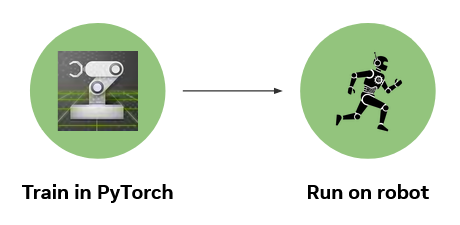
Boundary between Isaac Lab training and deployment.#
Export from the -ROS-Inference task id so the traced observation and action layout matches deployment. If
you followed the training steps above this is the same id you trained on, and no configuration swap is needed. In
joint space that is a NoJointVel variant (14-dim actor input); in task space it is
-TaskSpace-ROS-Inference (18-dim actor input).
Export with LEAPP (Recommended)#
LEAPP (Lightweight Export Annotations for Policy Pipelines) is the default and recommended path from a trained checkpoint to real-robot inference. It packages the policy together with input/output semantics (observation ordering, action scaling, recurrent LSTM state) so Isaac ROS deployment does not need to reimplement Isaac Lab preprocessing by hand.
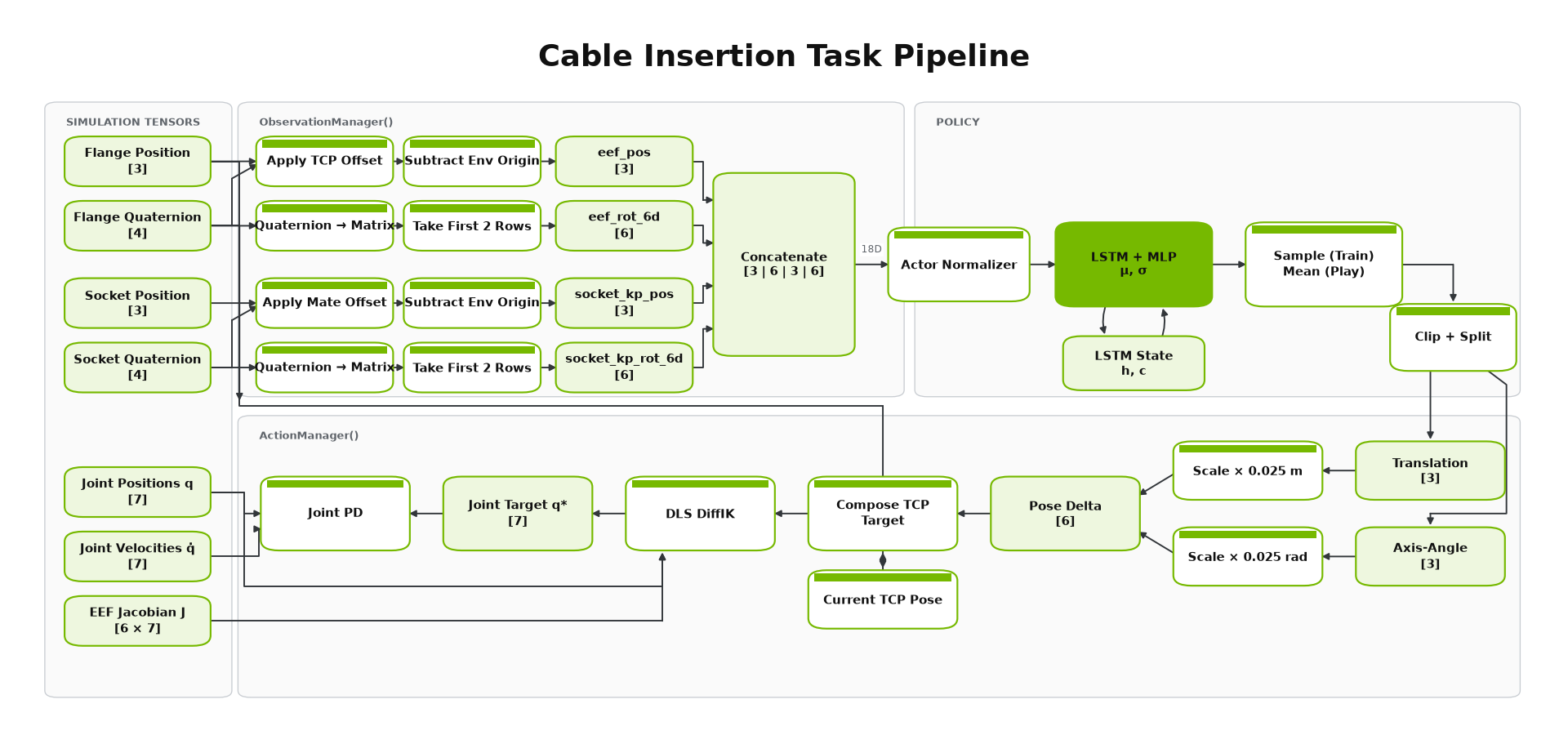
Isaac Lab policy data path through observation processing, recurrent inference, and action post-processing.#
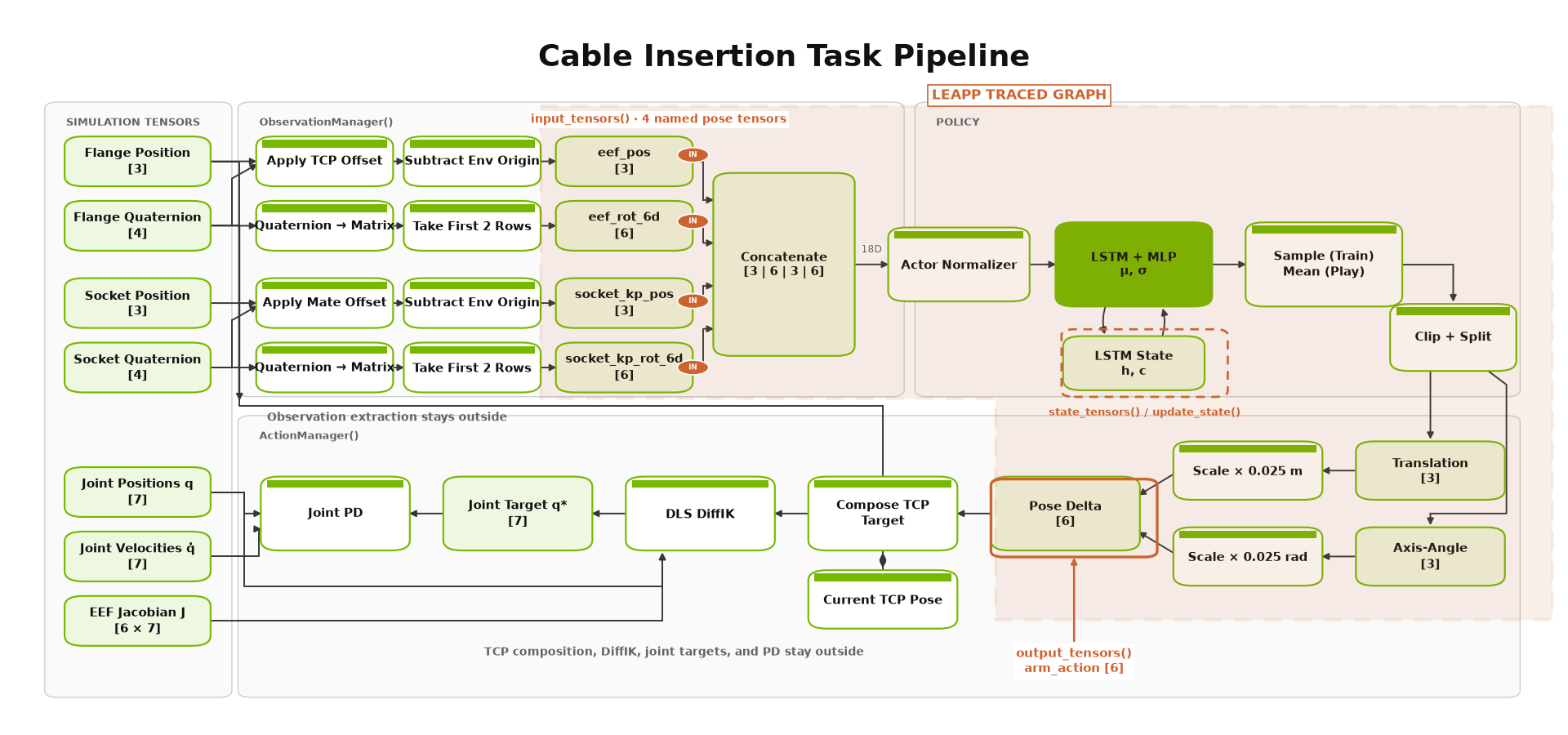
LEAPP annotations mark the deployable input/output tensors inside the Isaac Lab pipeline.#
Prerequisites: a trained checkpoint, and the leapp optional dependency. With uv it is
pulled in by the leapp extra, so no separate install step is needed — just pass
--extra leapp on the export command. In a self-managed environment, install it directly:
pip install leapp
Export the policy:
Uses the packaged RSL-RL exporter:
uv run --extra leapp isaaclab-training-export \
    --task IsaacTraining-DisplayPortInsertion-Rizon4s-Joint-NoJointVel-ROS-Inference \
    --checkpoint logs/rsl_rl/displayport_insertion_rizon4s/<run_timestamp>/model_<iteration>.pt
Uses the DisplayPort task-space contract (see Exporting a Task-Space Policy):
uv run --extra leapp isaaclab-training-export \
    --task IsaacTraining-DisplayPortInsertion-Rizon4s-TaskSpace-ROS-Inference \
    --checkpoint logs/rsl_rl/displayport_insertion_rizon4s/<run_timestamp>/model_<iteration>.pt \
    --contract displayport_task_space
Replace <run_timestamp> and <iteration> with your training log path.
By default, export artifacts are written next to the checkpoint:
Exported model (
.onnxby default, or.ptdepending on backend)LEAPP metadata YAML describing the policy I/O graph
Initial recurrent hidden state (
.safetensors) — this policy uses an LSTM actorPipeline graph visualization (
.png)
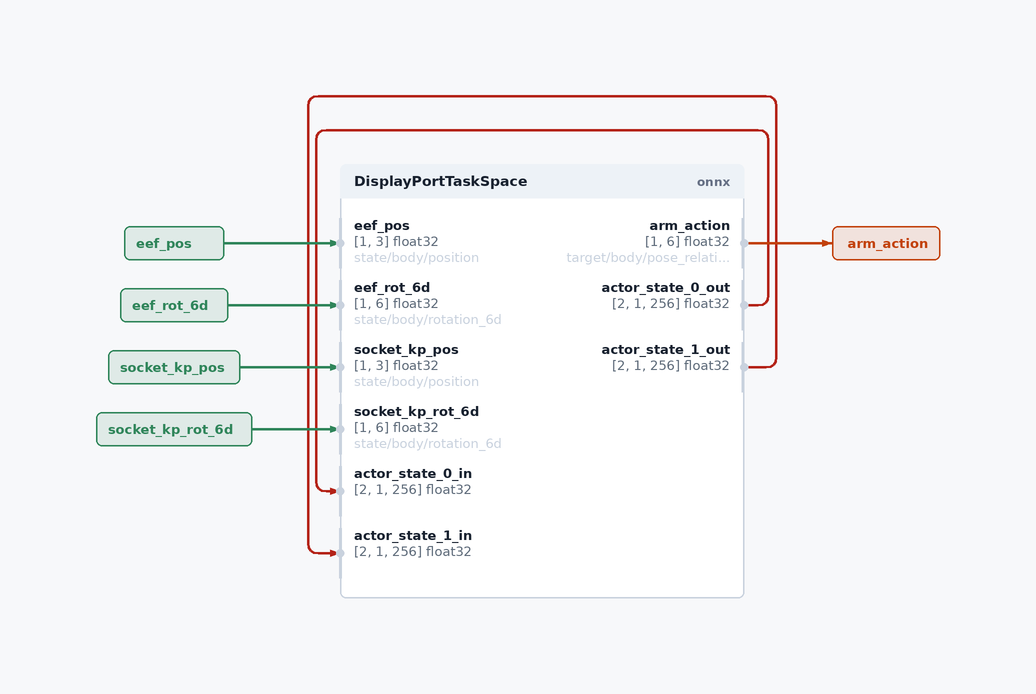
LEAPP-generated visualization of the exported policy interface and recurrent-state feedback.#
Useful export flags:
--export_method onnx-dynamo— default ONNX export backend--validation_steps 5— replay traced rollout data to verify the export (recommended; set0only for debugging)--export_save_path <dir>— write artifacts to a custom directory
See Exporting Policies with LEAPP for full CLI options, backend choices, and troubleshooting.
Validate the LEAPP export in simulation before real-robot deployment. Prefer the
DisplayPort-specific play entry point so you can fix socket poses, inject perception error,
and write policy_io.csv for sim/real overlay:
uv run isaaclab-training-play-policy-io \
    --task <ROS_INFERENCE_TASK_ID> \
    --leapp_model logs/rsl_rl/displayport_insertion_rizon4s/<run_timestamp> \
    --num_envs 1 \
    --socket_pos 0.476 0.127 0.07 \
    --max_steps 200 \
    --log_dir logs/dp_inference_runs \
    --visualizer kit
where <ROS_INFERENCE_TASK_ID> is ...-Joint-NoJointVel-ROS-Inference for a joint-space export or
...-TaskSpace-ROS-Inference for a task-space one.
--leapp_model accepts either the LEAPP deploy YAML or the export directory that
contains it. Pose overrides and CSV logging still apply. Do not combine
--leapp_model with --checkpoint or --replay_csv.
Deploy on hardware: pass the LEAPP export directory and metadata to your Isaac ROS / Isaac Manipulator workflow. Refer to the Isaac ROS manipulation DNN policy documentation for on-robot setup. The on-robot pipeline typically includes:
Perception — socket pose estimation
Motion planning — approach trajectory to the insertion station (if used)
Policy inference — LEAPP-exported policy at control frequency in the ROS inference node
Robot control — Flexiv commands derived from policy actions: joint-position deltas in joint space, or a Cartesian pose delta applied through the task-space bridge in task space
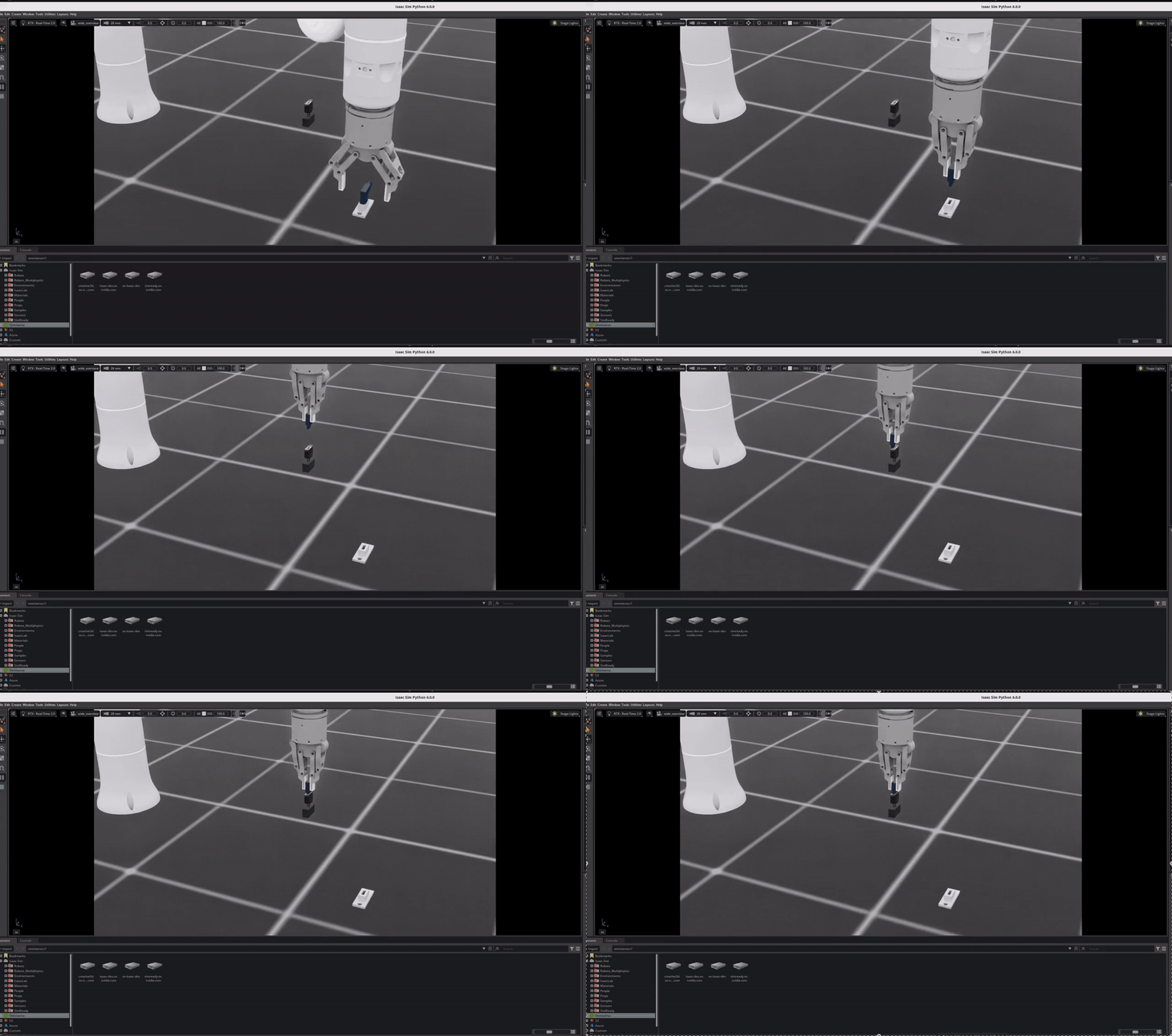
Complete Isaac Sim deployment run: pick the plug, move to hover, then hand off to the RL policy for insertion.#
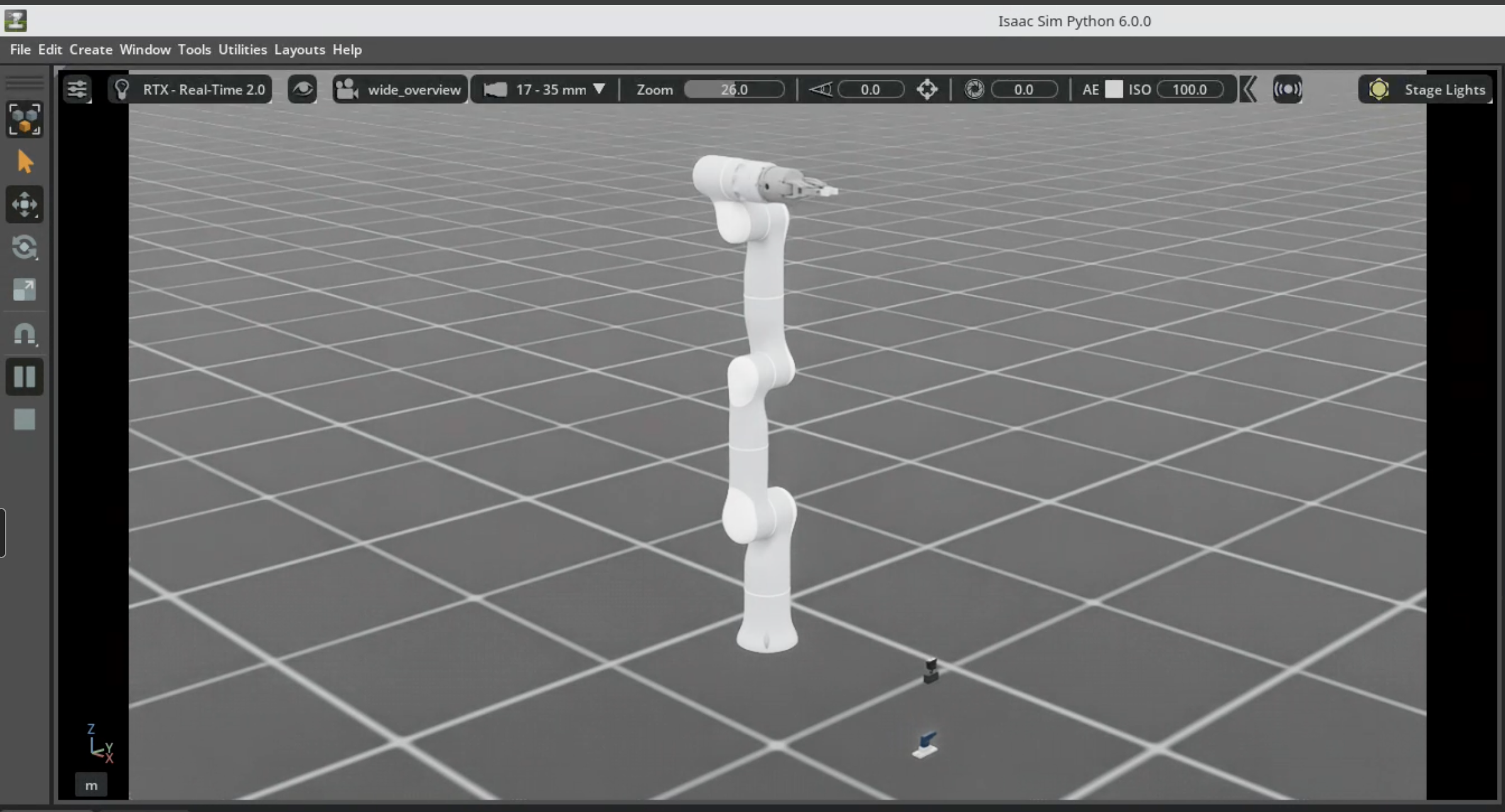
Isaac Sim deployment scene with the pickup fixture and socket.#
Deployment overview loop from the course material.#
Close-up deployment loop around the hand-off from motion planning to policy insertion.#
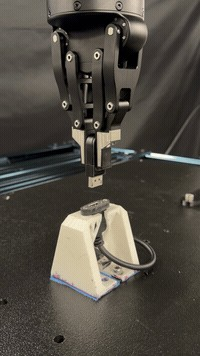
The DisplayPort plug seated on the physical Flexiv Rizon 4s setup.#
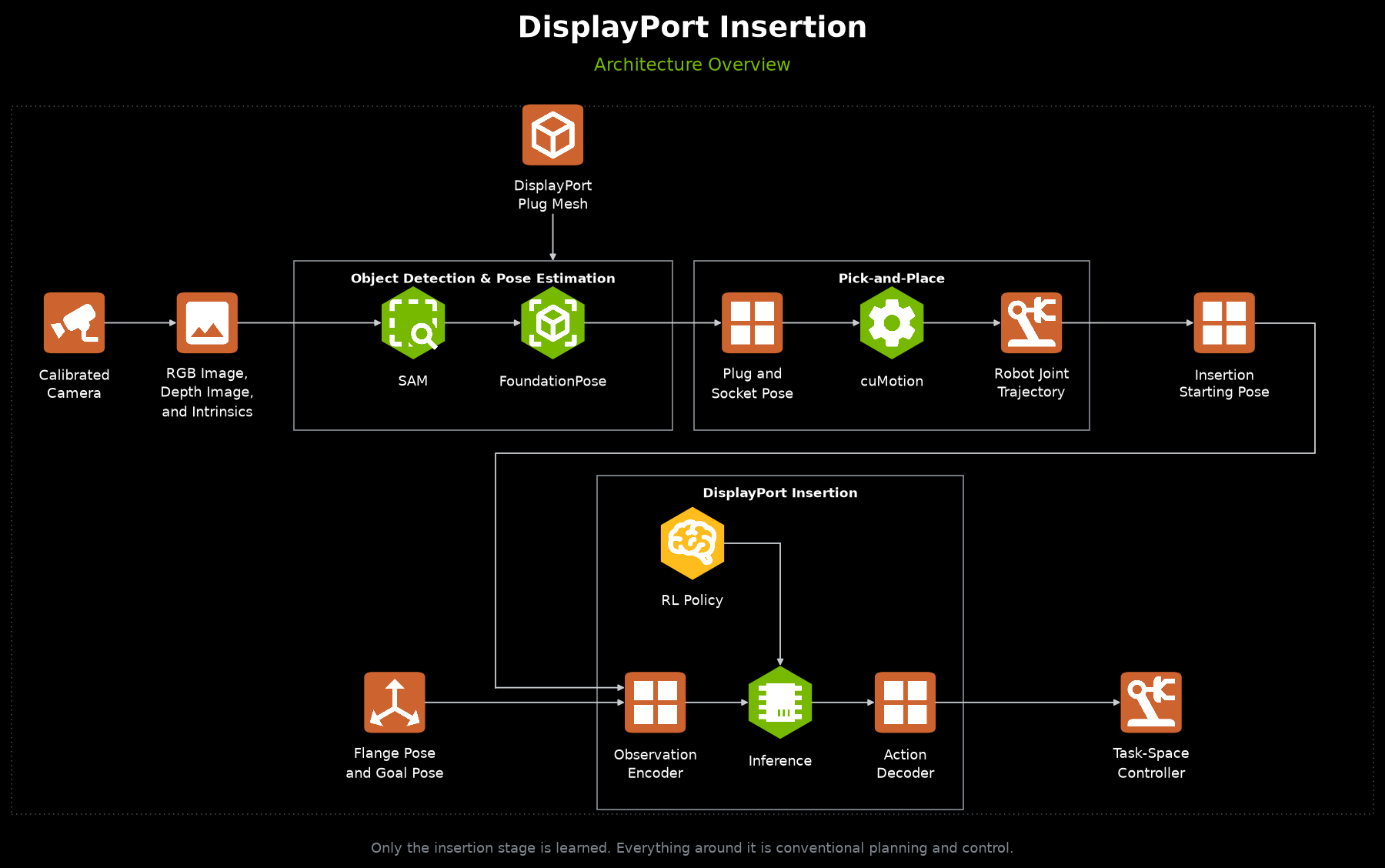
Full ROS deployment architecture: perception, motion planning, robot control, and policy inference.#
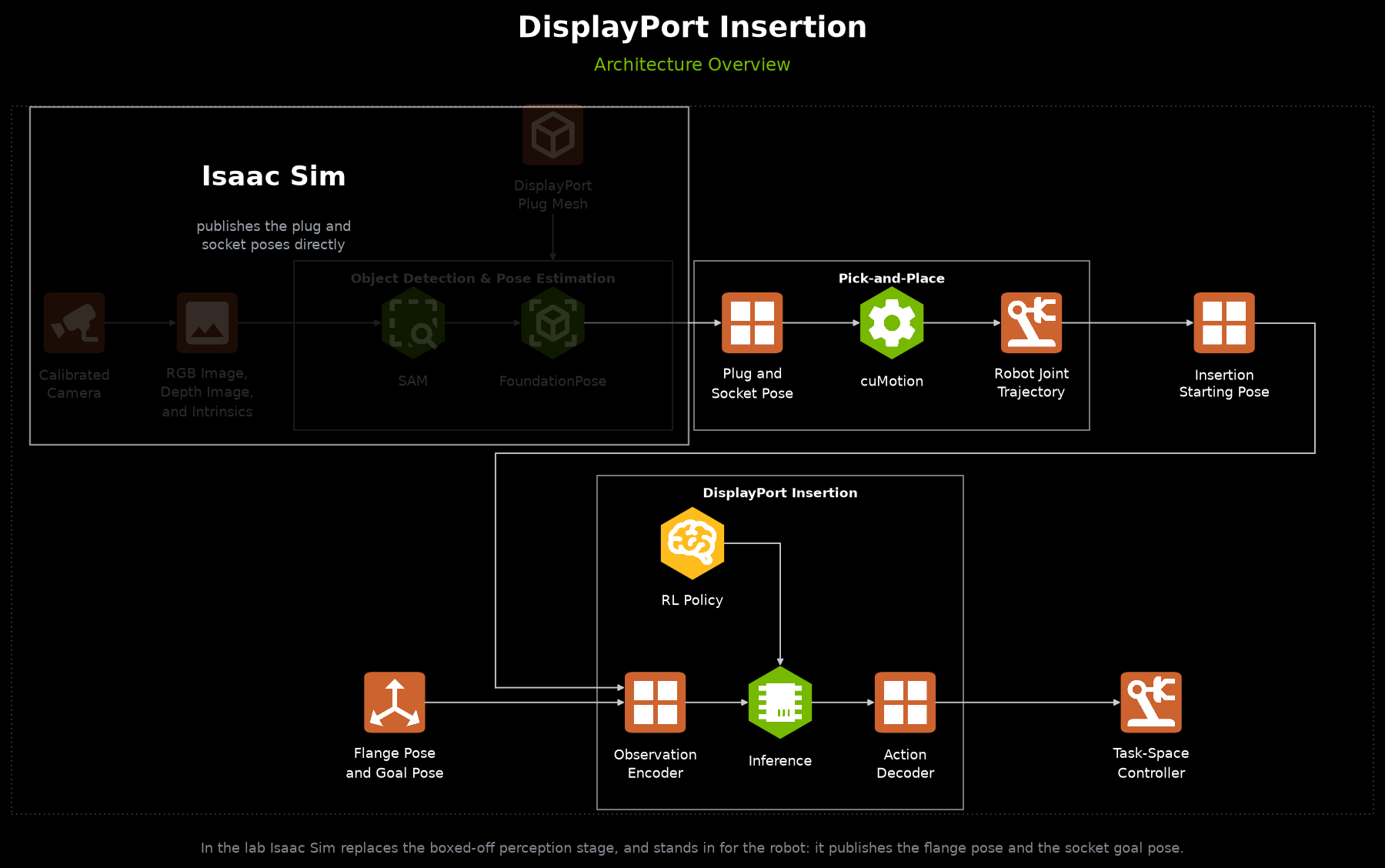
Simulation-backed deployment architecture, where Isaac Sim stands in for perception and the physical robot.#
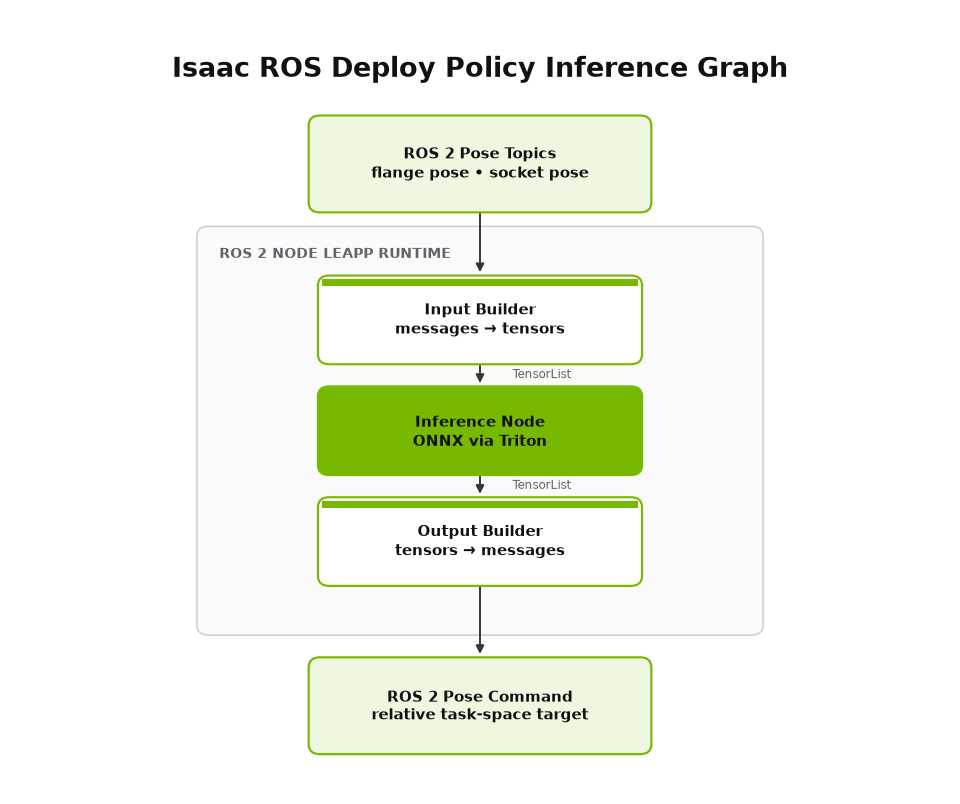
ROS 2 node deployment graph around the exported policy.#
The ROS inference environments define the deployment metadata LEAPP traces during export:
IsaacTraining-DisplayPortInsertion-Rizon4s-Joint-NoJointVel-ROS-Inference
obs_order:["arm_dof_pos", "socket_pos", "socket_quat"]policy_action_space:"joint"observation_space: 14action_space: 7joint_action_scale: 0.025
Fixed deployment poses are set in config/displayport_rizon_4s/ros_inference_env_cfg.py.
IsaacTraining-DisplayPortInsertion-Rizon4s-TaskSpace-ROS-Inference
obs_order:["eef_pos", "eef_rot_6d", "socket_kp_pos", "socket_kp_rot_6d"]policy_action_space:"task"(pose_rel)observation_space: 18action_space: 6action_scale: 0.025 (metres for translation, radians for rotation)
Fixed deployment poses are set in config/displayport_rizon_4s/task_space_ros_inference_env_cfg.py.
Exporting a Task-Space Policy#
A task-space checkpoint is exported with the packaged exporter and the
displayport_task_space contract because its action is a scaled 6-DoF Cartesian pose delta rather than joint
targets. The same exporter stays task-agnostic by loading task-specific contracts from
src/isaaclab_training/export/contracts.py:
uv run --extra leapp isaaclab-training-export \
    --task IsaacTraining-DisplayPortInsertion-Rizon4s-TaskSpace-ROS-Inference \
    --checkpoint logs/rsl_rl/displayport_insertion_rizon4s/<run_timestamp>/model_<iteration>.pt \
    --export_save_path <output_dir> \
    --contract displayport_task_space
The export writes a DisplayPortTaskSpace LEAPP package (.onnx graph, .yaml semantics, and
_initial_values.safetensors for the recurrent state). Its I/O contract is:
Inputs:
eef_pos(3),eef_rot_6d(6),socket_kp_pos(3),socket_kp_rot_6d(6), plus the actor LSTM state.Output:
arm_action(6) — apose_relCartesian delta[dx, dy, dz, dθx, dθy, dθz]consumed by the task-space bridge (isaaclab_connection: action:arm_action:pose_rel).
Validate it exactly as for the joint-space export above with isaaclab-training-play-policy-io and
--leapp_model pointing at the exported directory.
Alternative: Raw Checkpoint Deployment#
For development or legacy Isaac Manipulator setups, you can deploy the RSL-RL checkpoint directly without a LEAPP export step. This path uses the .pt checkpoint with agent.yaml and env.yaml from:
logs/rsl_rl/displayport_insertion_rizon4s/<run_timestamp>/model_<iteration>.pt
This is not recommended for shipping — you must manually ensure observation ordering, action scaling, and LSTM state handling match training. Prefer the LEAPP export path above for production deployment.
Troubleshooting#
PhysX Collision Stack Overflow#
Error Message:
PhysX error: PxGpuDynamicsMemoryConfig::collisionStackSize buffer overflow detected
Cause: GPU collision buffer is too small for contact-rich plug/socket interaction across many parallel environments.
Solution: Increase gpu_collision_stack_size in displayport_insertion_env_cfg.py (default is 2**30):
sim: SimulationCfg = SimulationCfg(
    physics=PhysxCfg(
        gpu_collision_stack_size=2**31,  # Increase if overflow persists
        gpu_max_rigid_contact_count=2**23,
        gpu_max_rigid_patch_count=2**23,
    ),
)
CUDA Out of Memory#
Solutions (in order of preference):
Reduce parallel environments:
uv run isaaclab train --rl_library rsl_rl \
    --task <TASK_ID> \
    --num_envs 128 \
    --viz none
Reduce plug/socket
solver_position_iteration_countindisplayport_insertion_env_cfg.py(trade-off: more penetration)Disable video recording during training
Deterministic Debugging (Play / Inference Script)#
For DisplayPort insertion, prefer the dedicated play entry point over the generic
uv run isaaclab play path. It keeps DP-specific pose overrides, perception-error
injection, and policy_io.csv logging out of the shared play entrypoint.
The examples below use the joint-space ROS-inference task. They apply unchanged to a task-space policy —
substitute ...-TaskSpace-ROS-Inference for the --task id and point --checkpoint (or
--leapp_model) at the corresponding run.
RSL-RL checkpoint (recommended shipping task):
uv run isaaclab-training-play-policy-io \
    --task IsaacTraining-DisplayPortInsertion-Rizon4s-Joint-NoJointVel-ROS-Inference \
    --checkpoint logs/rsl_rl/displayport_insertion_rizon4s/<run>/model_<iteration>.pt \
    --num_envs 1 \
    --socket_pos 0.476 0.127 0.07 \
    --observed_socket_pos 0.486 0.127 0.07 \
    --max_steps 200 \
    --log_dir logs/dp_inference_runs \
    --visualizer kit
Exact first observation from real/sim CSV (closed-loop; injects obs_* from the
chosen row as the first policy input, then continues with live sim observations):
uv run isaaclab-training-play-policy-io \
    --task IsaacTraining-DisplayPortInsertion-Rizon4s-Joint-NoJointVel-ROS-Inference \
    --checkpoint logs/rsl_rl/displayport_insertion_rizon4s/<run>/model_<iteration>.pt \
    --init_obs_csv rollouts/sim_real_compare/real_policy_gt_sock.csv \
    --socket_pos 0.475 0.125 0.07 \
    --num_envs 1 \
    --max_steps 200 \
    --log_dir logs/dp_init_obs_runs \
    --visualizer kit
Unset --robot_joint_pos / --observed_socket_* are seeded from that CSV row so the
scene starts aligned. Use --init_obs_step N to pick a non-zero row. Works with
--leapp_model as well; not compatible with --replay_csv.
LEAPP-exported ONNX policy (same script; see Step 3 above for --leapp_model).
Open-loop replay of a logged policy_io.csv / real rollout:
uv run isaaclab-training-play-policy-io \
    --task IsaacTraining-DisplayPortInsertion-Rizon4s-Joint-NoJointVel-ROS-Inference \
    --replay_csv rollouts/sim_real_compare/real_policy.csv \
    --socket_pos 0.475 0.125 0.07 \
    --log_dir rollouts/sim_real_compare/replay_run \
    --visualizer kit
Pose conventions:
--socket_pos/--observed_socket_posare socket insertion-geometry world positions (mate point), matchingfixed_asset_init_pos_center, not the USD root. The USD root is derived viacompute_socket_root.Quaternions are
(x, y, z, w).If
--observed_socket_*is omitted, the policy observes the true simulated socket pose.Telemetry is written to
policy_io.csv(+run_config.json) under--log_diror<checkpoint_dir>/inference_logs/<timestamp>/.
Generic play (no DP pose / CSV knobs) still works for a quick smoke test:
uv run isaaclab play --rl_library rsl_rl \
    --task IsaacTraining-DisplayPortInsertion-Rizon4s-Joint-NoJointVel-Play \
    --num_envs 1 \
    --checkpoint <path_to_model.pt>
To match a specific real-world station layout, edit the workspace constants in config/displayport_rizon_4s/joint_pos_env_cfg.py (training layout) or config/displayport_rizon_4s/ros_inference_env_cfg.py (deployment layout):
# Training station layout (joint_pos_env_cfg.py)
_GEOMETRY_POS = (0.475, 0.125, 0.06)
_SOCKET_ROT = (0.5, 0.5, 0.5, -0.5)

# Deployment layout (ros_inference_env_cfg.py)
_DEPLOY_GEOMETRY_POS = (0.476, 0.127, 0.07)
_DEPLOY_SOCKET_ROT = (0.5, 0.5, 0.5, -0.5)
This workflow is useful for:
Comparing simulated and real-world policy behavior at a known socket pose
Validating LEAPP exports before hardware deployment
Verifying plug grasp and approach trajectories before full perception integration
Debugging insertion failures at a fixed station configuration
Further Resources#
Gear Assembly Sim-to-Real Tutorial: walkthrough_sim_to_real
Exporting Policies with LEAPP: /source/policy_deployment/05_leapp/exporting_policies_with_leapp
RL Training Tutorial: tutorial-run-rl-training